Shopee Seller Fees Philippines: 2026 Guide
By Jerome Ko · Reviewed August 16, 2026 · Sources & methodology
Every Shopee order can carry several deductions before a payout is released. This guide maps current components, distinguishes published reference rates from a settlement result, and gives you a statement-to-calculator workflow. Rates are verified against the Shopee PH Seller Education Hub; confirm the terms and line items in your own Seller Centre because enrolment, assessment basis, adjustments, and rounding can vary.
Current-source reminder: confirm Seller Growth from the listing’s category and the seller’s current eligibility context. Do not use historical program comparisons as a substitute for the source row and completed-order evidence.
Commission Fee
Match the current Mall or Marketplace source row.
Transaction Fee
Confirm the current source rule and order context.
Shipping Fee + OPF
Use published references to identify the line, not reconstruct a total.
Statement-only records
Do not turn a statement-only line into a fee formula.
Mega Discount Voucher
Check the current listing enrolment and statement line.
Optional programme evidence
Keep programme scope with comparable statement records.
Seller Growth Support Fee
Mandatory (new May 11, 2026); 90-day new-seller exemption
Payment-method record
Keep the current programme terms and statement line
1. Commission Fee
Commission is category- and seller-type-specific. Use the current Mall or Marketplace source row that matches the exact listing, and leave an unmatched category unverified rather than borrowing a nearby percentage.
Retain the listing category, seller type, source date, and completed-order statement together. That record lets you confirm the component with FeeCalc where its documented input applies without using an independent worked total.
For a full breakdown of every category and sub-category, see the Commission Rates page. Source: Shopee PH Seller Education Hub.
2. Transaction Fee
Transaction treatment should be verified from the current source and completed-order record. Use the calculator only for the documented component and do not convert a standalone percentage into a combined settlement claim. If a statement deduction needs review, match its label and evidence first. Source: Shopee PH Seller Education Hub.
3. Shipping Fee and Order Processing Fee (OPF)
Shopee publishes separate Marketplace and Mall shipping references. Use the current seller source and the order’s actual shipping line to identify the component; the published reference alone does not establish its settlement basis, rounding, or adjustments.
The ₱5 Order Processing Fee applies after the first 50 successful orders per seller per calendar month. Check the completed order’s waiver status before treating the line as chargeable. For a deeper evidence workflow, see the shipping guide.
For a high-ticket listing, record the cap shown in the current seller terms and inspect two completed orders. For a low-ticket listing, record the separate OPF line and whether the public first-50 monthly waiver applies to that completed order. This is safer than assuming a threshold or total from a headline rate. Source: Shopee PH Seller Education Hub.
4. Statement-only records
When a statement line is outside the calculator’s documented model, keep its label, order reference, applicable source record, and period together. Do not turn an unresolved line into a formula or add it to a hand-built settlement total.
5. Mega Discount Voucher (MDV)
MDV is an optional programme with published base terms. Keep the enrolled listing, current programme record, and completed-order line together; the available material does not establish a universal settlement calculation.
Before opting in, keep a listing-level record of the campaign, current terms, completed-order reference, and resulting statement line. The public calculator can model only its stated inputs; it does not settle ambiguous optional-program adjustments. See the optional-program decision guide for a practical evidence workflow. Source: Shopee PH Seller Education Hub.
6. Programme history is not a settlement rule
Do not use historical programme comparisons to forecast a current order. Preserve current listing terms and the completed-order statement instead; a programme label alone does not establish a settlement amount.
7. Live Xtra Service Fee
Live XTRA has a published source-bound base for confirmed participation. Keep any linked adjustment unmodeled because the reviewed material does not provide a calculation method for a completed-order settlement.
Live Xtra is most beneficial for sellers who actively and frequently use Shopee Live. If you rarely stream, the additional fee cost is not justified. Source: Shopee PH Seller Education Hub.
8. Payment-method records
Payment-method terms and any statement charge depend on the current seller programme and the buyer's selected plan; they are not modeled by the public calculator.
Use a payment-method review rather than a hand calculation: save the plan shown on the completed order, the current program terms, and the statement line; then compare conversion, cancellations, and margin from comparable listings. If that evidence is incomplete, leave the charge out of a price forecast and ask Seller Support for the settlement basis. Source: Shopee PH Seller Education Hub.
9. Seller Growth Support Fee
The Seller Growth Support Fee is category-specific. Confirm the selected category and eligibility in current seller materials; a category without a verified lookup remains unverified. For the dedicated workflow, see the Seller Growth Support Fee guide.
Rate
Use the selected-category lookup from the maintained fee data, then retain the matching source row. Do not turn a nearby category or an older comparison into a rate for a different listing.
Who pays it?
Eligibility depends on the current category and seller context. The published new-seller exception is time-based:
- New seller exception: the reviewed guidance describes 90 days from the first product listing. Verify the account-specific start date before treating a completed order as chargeable.
Evidence workflow
Record the category, seller context, source date, and statement line. Use the conservative reverse-pricing tool only after modelable inputs are confirmed; it does not replace settlement evidence.
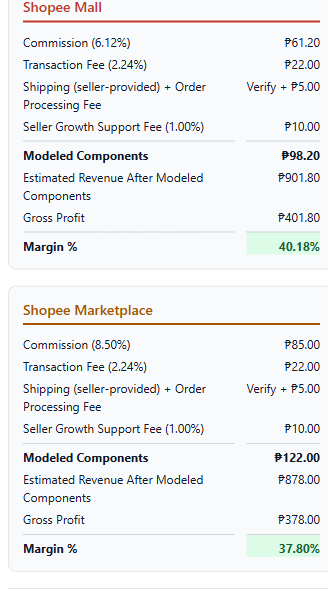
Screenshot assumptions and modeled results
The screenshot uses one item under the public day-91/51st-order assumption; it is a transparent example, not a payout statement.
- Inputs
- SRP: ₱1,000.00; Sale price: ₱1,000.00; Cost: ₱500.00; Mobile & Gadgets → Mobile Phones.
- Context
- Shipping: unverified and excluded from the modeled total; Order Processing Fee: ₱5.00 included after the first 50 successful orders per seller per calendar month.
- Mall
- Modeled components: ₱98.20; Margin: 40.18%.
- Marketplace
- Modeled components: ₱122.00; Margin: 37.80%.
Completed-order evidence workflow
Do not reconstruct a combined order total from reference rates. For a completed order, retain the category row, seller type, order-processing eligibility, shipping statement line, optional-program status, and any withholding certificate. Enter only documented modelable inputs in FeeCalc; leave statement-only or unverified components outside the estimate.
- Match commission and Seller Growth to the exact listing category.
- Check the order-processing waiver and new-seller context.
- Use the actual shipping context rather than an inferred percentage basis.
- Compare optional-program and payment-method lines with the current terms.
- Resolve a mismatch with the statement before changing a price.
For the full Mall-vs-Marketplace analysis — including when Mall's lower commission outweighs its stricter requirements — see the Commission Rates page.
Component review matrix
| Fee | Rate | Evidence boundary |
|---|---|---|
| Commission | Exact current category row | Use FeeCalc only after category and seller type match. |
| Transaction | Current source rule | Use only the documented model input. |
| Shipping | Published reference plus actual statement line | Do not infer settlement basis or rounding. |
| Order processing | Completion and waiver status | Check the first-50-successful-orders monthly waiver. |
| Optional programmes | Current enrolment and statement line | Keep ambiguous adjustments unmodeled. |
| Payment-method records | Current terms and selected plan | Statement-only in this public workflow. |
2026 Fee Changelog
We only list confirmed changes here — see our Editorial Policy for how we verify and update rate information. If you notice a discrepancy between this guide and your Seller Centre, your Seller Centre figures are authoritative; please let us know so we can investigate.
Related Guides
This page covers the fee mechanics. The articles below go deeper on specific topics:
- Seller Growth Support Fee: What Shopee Sellers Need to Know — Full guide to the new mandatory fee introduced May 11, 2026, with per-category rate guidance and the 90-day exemption explained
- Shopee BIR Withholding Tax Explained — Full walkthrough of RR 16-2023, Form 2307, and the ₱500,000 de-minimis
- Why Is My Shopee Payout Lower Than Expected? — Diagnosing common payout surprises
- How to Calculate Your Target SRP from a Desired Margin — Work backwards from margin to set your price
- Shopee Bulk Fee Calculator: Price Your Whole Inventory at Once — Upload Excel/CSV to review documented modelable estimates and warnings by row
- Commission Rate Table by Category — Current published Mall and Marketplace category rows
- Shopee vs Lazada vs TikTok Shop Fees Compared — Side-by-side comparison of platform fees to help you decide where to sell
- Are Shopee Optional Programs Worth It? — MDV, Live Xtra, and SPayLater: when to enrol and when to skip
- Shopee Returns: Who Pays the Shipping? — Seller and buyer responsibilities on returns and refunds
- Shopee Free Shipping Is Not Actually Free for Sellers — How the shipping subsidy fee works and what it really costs you
- Shopee Penalty Points 2026 — How the penalty point system works and how to avoid suspensions
- 8% Flat Tax vs Percentage Tax for Shopee Sellers — Choosing the right tax regime for your shop
- Do I Need to Register with the BIR as a Shopee Seller? — Registration thresholds, requirements, and practical steps
See all seller guides at Guides.
Check documented inputs
Enter confirmed selling price, cost, and category to estimate modelable fee and margin inputs.
Open the Fee CalculatorTips for Managing Shopee Fees
- Calculate before listing. Know your break-even selling price before you set your price. Factor in all modelable mandatory components, then keep statement-only deductions outside the estimate.
- Confirm Seller Growth by category. Use the matching current category record and seller eligibility context. Do not compare it with historical programme labels or substitute an unverified category rate.
- Review shipping evidence before pricing. Confirm the actual shipping line, current terms, and seller context instead of converting a published reference into a price threshold.
- Review optional programmes case by case. Use the calculator for its documented inputs and retain statement-only charges outside the estimate.
- Check your sub-category rate. Rates differ within main categories — always confirm the rate for your specific sub-category in Seller Centre. This applies equally to commission rates and the Seller Growth Support Fee.
- Collect Form 2307. If Shopee is withholding BIR tax from your payouts, make sure you receive Form 2307 each quarter. This is your credit document for income tax filing.
- Re-verify rates periodically. Shopee can update fees with limited notice. Re-run your margin calculations whenever you see a Seller Centre announcement.
Short answer: Shopee fees depend on category, seller age, order number, and enrolled programs. Verify an unknown category rate instead of using a fallback.
By Jerome Ko · Reviewed 2026-08-16 · Source status: verified.
- Shopee Terms of Service — Shopee Philippines Inc.; Updated 2026-08-14; checked 2026-08-17.
- Seller Fees — Shopee Philippines Inc.; Dated 2026-04-25; Updated 2026-04-27; checked 2026-08-17.
- Platform Shipping Fee — Shopee Philippines Inc.; Dated 2024-06-18; Updated 2025-05-13; checked 2026-08-17.
The ₱5 Order Processing Fee applies after the first 50 successful orders per seller per calendar month; do not use a published reference rate as an order-level total where its basis or adjustments are unknown.
The calculator compares documented modelable inputs; it does not provide a complete settlement or payout total.